
About tensor
Updated:
텐서의 기초
import tensorflow as tf
import numpy as np
Tensors are multi-dimensional arrays with a uniform type (called a dtype). You can see all supported dtypes at tf.dtypes.DType.
If you’re familiar with NumPy, tensors are (kind of) like np.arrays.
All tensors are immutable like Python numbers and strings: you can never update the contents of a tensor, only create a new one.
텐서는 dtype이라 불리는 uniform type을 가진 다차원 행렬이다. 만약 넘파이에 익숙하다면, 텐서는 넘파이의 일종으로 느껴질 것이다.
모든 텐서는 파이썬의 숫자와 문자열과 같이 바꿀수 없다. 즉 새로 만드는거 외에는 텐서의 내용물을 바꿀수 없다.
Basics
Let’s create some basic tensors.
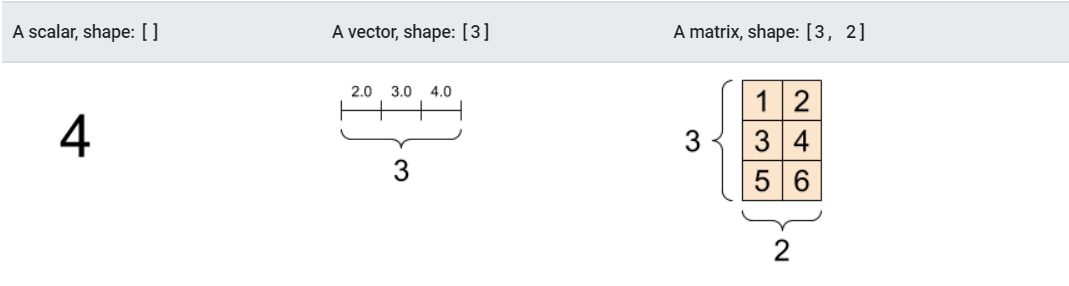
Here is a “scalar” or “rank-0” tensor . A scalar contains a single value, and no “axes”.
간단한 텐서를 만들어보자.
여기에 “스칼라” 또는 “rank-0” 텐서. 스칼라는 single value를 포함하고, “axes”를 포함하지 않는다.
# 기본적으로 dtype이 int32 텐서가 된다.
rank_0_tensor = tf.constant(4)
print(rank_0_tensor)
tf.Tensor(4, shape=(), dtype=int32)
A “vector” or “rank-1” tensor is like a list of values. A vector has one axis:
“벡터” 또는 “rank-1” 텐서는 values의 리스트와도 같다.
벡터는 하나의 axis를 갖는다.
# float tensor를 만들어보자.
rank_1_tensor = tf.constant([2.0, 3.0, 4.0])
print(rank_1_tensor)
tf.Tensor([2. 3. 4.], shape=(3,), dtype=float32)
A “matrix” or “rank-2” tensor has two axes:
“행렬” 또는 “rank-2” 텐서는 두개의 axes를 가진다.
# If you want to be specific, you can set the dtype (see below) at creation time
# 만약 구체적인걸 원한다면, 생성시 dtype을 설정할수 있다.

rank_2_tensor = tf.constant([[1, 2],
                             [3, 4],
                             [5, 6]], dtype=tf.float16)
print(rank_2_tensor)
tf.Tensor(
[[1. 2.]
 [3. 4.]
 [5. 6.]], shape=(3, 2), dtype=float16)
Tensors may have more axes; here is a tensor with three axes:
텐서는 더많은 axes를 가질수있다.
axes가 3인 텐서를 살펴보자.
# There can be an arbitrary number of
# axes (sometimes called "dimensions")
rank_3_tensor = tf.constant([
  [[0, 1, 2, 3, 4],
   [5, 6, 7, 8, 9]],
  [[10, 11, 12, 13, 14],
   [15, 16, 17, 18, 19]],
  [[20, 21, 22, 23, 24],
   [25, 26, 27, 28, 29]],])

print(rank_3_tensor)
tf.Tensor(
[[[ 0  1  2  3  4]
  [ 5  6  7  8  9]]

 [[10 11 12 13 14]
  [15 16 17 18 19]]

 [[20 21 22 23 24]
  [25 26 27 28 29]]], shape=(3, 2, 5), dtype=int32)
There are many ways you might visualize a tensor with more than two axes.
3개 이상의 axes를 가지는 텐서를 표현하는데는 많은 방법이 있다.

You can convert a tensor to a NumPy array either using np.array or the tensor.numpy method:
tensor를 Numpy 어레이로 변환할수 있다.
numpy array 사용
np.array(rank_2_tensor)
array([[1., 2.],
       [3., 4.],
       [5., 6.]], dtype=float16)
numpy method 사용
rank_2_tensor.numpy()
array([[1., 2.],
       [3., 4.],
       [5., 6.]], dtype=float16)
Tensors often contain floats and ints, but have many other types, including:
- complex numbers
- strings
The base tf.Tensor class requires tensors to be “rectangular”—that is, along each axis, every element is the same size. However, there are specialized types of tensors that can handle different shapes:
- Ragged tensors (see RaggedTensor below)
- Sparse tensors (see SparseTensor below)
You can do basic math on tensors, including addition, element-wise multiplication, and matrix multiplication.
텐서는 기본적으로 부동소수점과 정수형을 포함하지만, 다른 types의 자료형 역시 포함한다.
- 복소수
- 문자형
tf.Tensor 클래스는 텐서가 “직사각형”이 되는것을 요구한다. 즉, 각 축을 따라서, 모든 원소가 같은 크기를 가져야한다. 그러나 텐서는 다른 모양을 다룰 수 있는, 직사각형이 아닌 경우에도 이를 처리할수 있는 특수한 타입을 가지고 있다.
- 비정형 텐서
- 희소 텐서
텐서는 기본적으로 연산을 수행할수 있다. 덧셈, 원소별 곱셈 외에도 행렬의 곱까지도 가능하다.
a = tf.constant([[1, 2],
                 [3, 4]])
b = tf.constant([[1, 1],
                 [1, 1]]) # `tf.ones([2,2])`또한 가질수 있다.

print(tf.add(a, b), "\n")
print(tf.multiply(a, b), "\n")
print(tf.matmul(a, b), "\n")
tf.Tensor(
[[2 3]
 [4 5]], shape=(2, 2), dtype=int32)

tf.Tensor(
[[1 2]
 [3 4]], shape=(2, 2), dtype=int32)

tf.Tensor(
[[3 3]
 [7 7]], shape=(2, 2), dtype=int32)
수학 연산
print(a + b, "\n") # 원소합
print(a * b, "\n") # 원소곱
print(a @ b, "\n") # 행렬곱
tf.Tensor(
[[2 3]
 [4 5]], shape=(2, 2), dtype=int32)

tf.Tensor(
[[1 2]
 [3 4]], shape=(2, 2), dtype=int32)

tf.Tensor(
[[3 3]
 [7 7]], shape=(2, 2), dtype=int32)
Tensors are used in all kinds of operations (ops).
텐서는 모든 종류의 연산(ops)에 사용된다.
c = tf.constant([[4.0, 5.0], [10.0, 1.0]])

# 최댓값 찾기
print(tf.reduce_max(c))
# 최댓값의 인덱스 찾기
print(tf.argmax(c))
# softmax 연산
print(tf.nn.softmax(c))
tf.Tensor(10.0, shape=(), dtype=float32)
tf.Tensor([1 0], shape=(2,), dtype=int64)
tf.Tensor(
[[2.6894143e-01 7.3105860e-01]
 [9.9987662e-01 1.2339458e-04]], shape=(2, 2), dtype=float32)
About shapes
Tensors have shapes. Some vocabulary:
Shape: The length (number of elements) of each of the axes of a tensor. Rank: Number of tensor axes. A scalar has rank 0, a vector has rank 1, a matrix is rank 2. Axis or Dimension: A particular dimension of a tensor. Size: The total number of items in the tensor, the product shape vector.
Note: Although you may see reference to a “tensor of two dimensions”, a rank-2 tensor does not usually describe a 2D space.
텐서는 형상을 갖고 있습니다. 쓰이는 용어를 살펴보면
- 형상 : 텐서의 각 축의 길이(원소의 수)
- 랭크 : 축의 갯수. 스칼라는 rank 0, 벡터는 rank 1, 행렬은 rank 2.
- 축 또는 차원 : 텐서의 특정한 차원
- 사이즈 : 텐서 안의 항목의 총 갯수. 생성된 형상 벡터
주의!
“2차원 텐서”에 대한 참조가 있을수 있지만, rank-2 텐서는 항상 2차원 형상이 아니다.
Tensors and tf.TensorShape objects have convenient properties for accessing these:
텐서와 tf.TensorShape는 다음을 엑세스하기에 편리한 성질이 있습니다.
rank_4_tensor = tf.zeros([3, 2, 4, 5])
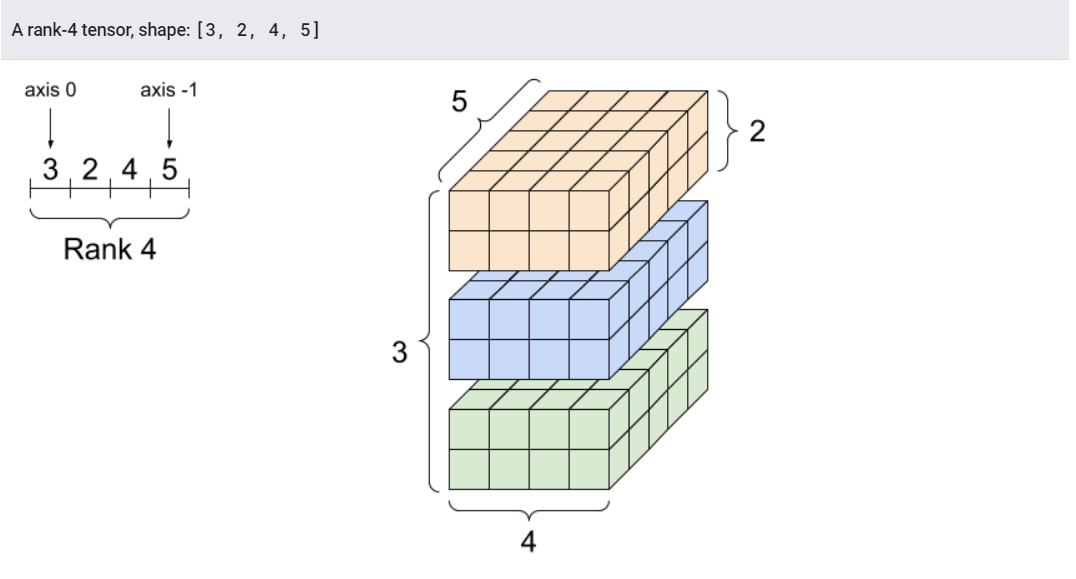
print("모든 원소의 타입:", rank_4_tensor.dtype)
print("축의 갯수:", rank_4_tensor.ndim)
print("텐서의 형상:", rank_4_tensor.shape)
print("0번 축의 원소들:", rank_4_tensor.shape[0])
print("마지막 축의 원소들:", rank_4_tensor.shape[-1])
print("모든 원소의 갯수 (3*2*4*5): ", tf.size(rank_4_tensor).numpy())
모든 원소의 타입: <dtype: 'float32'>
축의 갯수: 4
텐서의 형상: (3, 2, 4, 5)
0번 축의 원소들: 3
마지막 축의 원소들: 5
모든 원소의 갯수 (3*2*4*5):  120
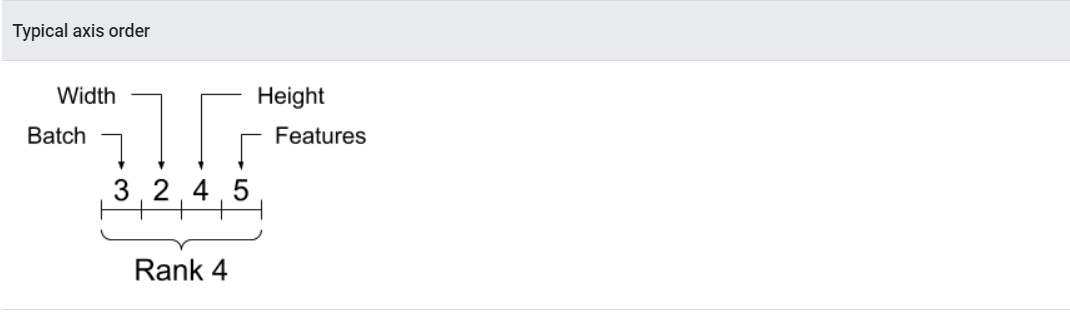
While axes are often referred to by their indices, you should always keep track of the meaning of each. Often axes are ordered from global to local: The batch axis first, followed by spatial dimensions, and features for each location last. This way feature vectors are contiguous regions of memory.
축은 보통 인덱스에 의해 참조되는 되는데, 그것들이 항상 무엇을 의미하는지 파악해야 한다.
축들은 자주 전역에서 로컬로 정렬된다. 배치축을 시작으로, 공간차원, 마지막으로 각 위치의 특성 순이다. 이로인해, 특성 벡터는 메모리에 연속적으로 할당될수 있다.
Indexing
Single-axis indexing
TensorFlow follows standard Python indexing rules, similar to indexing a list or a string in Python, and the basic rules for NumPy indexing.
- indexes start at 0
- negative indices count backwards from the end
- colons, :, are used for slices: start:stop:step
단일 축 인덱싱
텐서플로우는 파이썬의 리스트 또는 문자열 인덱싱과 유사한 표준 파이썬 인덱싱 규칙과 넘파이 인덱싱의 기본규칙을 따른다.
- 인덱스는 0부터 시작한다.
- 음수 인덱스는 마지막으로부터 거꾸로 센다.
- ”:”은 슬라이싱에 사용된다. :start:stop:step
rank_1_tensor = tf.constant([0, 1, 1, 2, 3, 5, 8, 13, 21, 34])
print(rank_1_tensor.numpy())
[ 0 1 1 2 3 5 8 13 21 34]
Indexing with a scalar removes the axis:
스칼라 인덱싱은 축을 제거한다.
print("First:", rank_1_tensor[0].numpy())
print("Second:", rank_1_tensor[1].numpy())
print("Last:", rank_1_tensor[-1].numpy())
First: 0
Second: 1
Last: 34
Indexing with a : slice keeps the axis:
:을 이용한 인덱싱은 축을 유지한다.
print("모든 원소 인덱싱:", rank_1_tensor[:].numpy())
print("4 이전까지 인덱싱:", rank_1_tensor[:4].numpy())
print("4 부터 끝까지 인덱싱:", rank_1_tensor[4:].numpy())
print("2부터 7까지 인덱싱:", rank_1_tensor[2:7].numpy())
print("홀수번째 원소:", rank_1_tensor[::2].numpy())
print("거꾸로:", rank_1_tensor[::-1].numpy())
모든 원소 인덱싱: [ 0  1  1  2  3  5  8 13 21 34]
4 이전까지 인덱싱: [0 1 1 2]
4 부터 끝까지 인덱싱: [ 3  5  8 13 21 34]
2부터 7까지 인덱싱: [1 2 3 5 8]
홀수번째 원소: [ 0  1  3  8 21]
거꾸로: [34 21 13  8  5  3  2  1  1  0]
Multi-axis indexing
Higher rank tensors are indexed by passing multiple indices.
The exact same rules as in the single-axis case apply to each axis independently.
랭크가 높은 텐서는 여러 인덱스를 전달하는것에 의해 인덱싱이 된다.
단일축과 정확히 같은 규칙이 각 축에 독립적으로 적용된다.
print(rank_2_tensor.numpy())
[[1. 2.]
 [3. 4.]
 [5. 6.]]
Passing an integer for each index, the result is a scalar.
정수를 각 인덱스에 넘기면 “스칼라”가 된다.
# Pull out a single value from a 2-rank tensor
print(rank_2_tensor[1, 1].numpy())
4.0
You can index using any combination of integers and slices:
정수와 “:”의 조합으로 인덱싱을 할수 있다.
# Get row and column tensors
print("Second row:", rank_2_tensor[1, :].numpy())
print("Second column:", rank_2_tensor[:, 1].numpy())
print("Last row:", rank_2_tensor[-1, :].numpy())
print("First item in last column:", rank_2_tensor[0, -1].numpy())
print("Skip the first row:")
print(rank_2_tensor[1:, :].numpy(), "\n")
Second row: [3. 4.]
Second column: [2. 4. 6.]
Last row: [5. 6.]
First item in last column: 2.0
Skip the first row:
[[3. 4.]
 [5. 6.]]
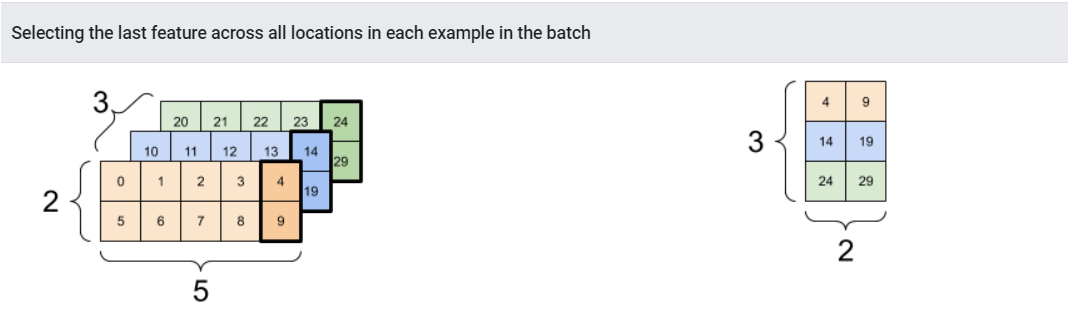
Here is an example with a 3-axis tensor:
축이 3개인 텐서를 예로 들어보자.
print(rank_3_tensor[:, :, 4])
tf.Tensor(
[[ 4  9]
 [14 19]
 [24 29]], shape=(3, 2), dtype=int32)
Manipulating Shapes
Reshaping a tensor is of great utility.
텐서의 형상변환은 매우 편리하다.
# 형상은 축을 따라 사이즈를 보여주느 'TensorShape'오브젝트를 리턴한다.
x = tf.constant([[1], [2], [3]])
print(x.shape)
(3, 1)
# x.shape의 타입을 확인해보자
print(type(x.shape))
<class 'tensorflow.python.framework.tensor_shape.TensorShape'>
# 또한 이 'TensorShape'오브젝트를 파이썬리스트에 집어넣을수 있다.
print(x.shape.as_list())
[3, 1]
You can reshape a tensor into a new shape. The tf.reshape operation is fast and cheap as the underlying data does not need to be duplicated.
새로운 형상으로 텐서를 변환 할수있다.
tf.reshape 연산은 기본 데이터가 복사될 필요가 없기 때문에 빠르고 가볍다.
# 새로운 형상에 텐서를 변환할수 있다.
# 리스트로 전달하는 것을 주목해라
reshaped = tf.reshape(x, [1, 3])
print(x.shape)
print(reshaped.shape)
(3, 1)
(1, 3)
The data maintains its layout in memory and a new tensor is created, with the requested shape, pointing to the same data. TensorFlow uses C-style “row-major” memory ordering, where incrementing the rightmost index corresponds to a single step in memory.
데이터는 메모리에서 레이아웃을 유지하고, 같은 데이터를 가리키는 새로운 텐서가 요청된 형상으로 만들어진다.
텐서플로우는 C-스타일의 “행 우선” 메모리 순서를 사용하며, 가장 오른쪽 인덱스의 증가는 메모리의 1스텝에 해당한다.
print(rank_3_tensor)
tf.Tensor(
[[[ 0  1  2  3  4]
  [ 5  6  7  8  9]]

 [[10 11 12 13 14]
  [15 16 17 18 19]]

 [[20 21 22 23 24]
  [25 26 27 28 29]]], shape=(3, 2, 5), dtype=int32)
If you flatten a tensor you can see what order it is laid out in memory.
메모리에 어떤 순서로 놓여져 있는지는 텐서를 평평하게 하면, 즉 1차원으로 만들면 확인할수 있다.
# "형상" argument에 전달된 "-1"은 "해당하는 무엇이든지"를 뜻한다.
print(tf.reshape(rank_3_tensor, [-1]))
tf.Tensor(
[ 0  1  2  3  4  5  6  7  8  9 10 11 12 13 14 15 16 17 18 19 20 21 22 23
 24 25 26 27 28 29], shape=(30,), dtype=int32)
Typically the only reasonable use of tf.reshape is to combine or split adjacent axes (or add/remove 1s).
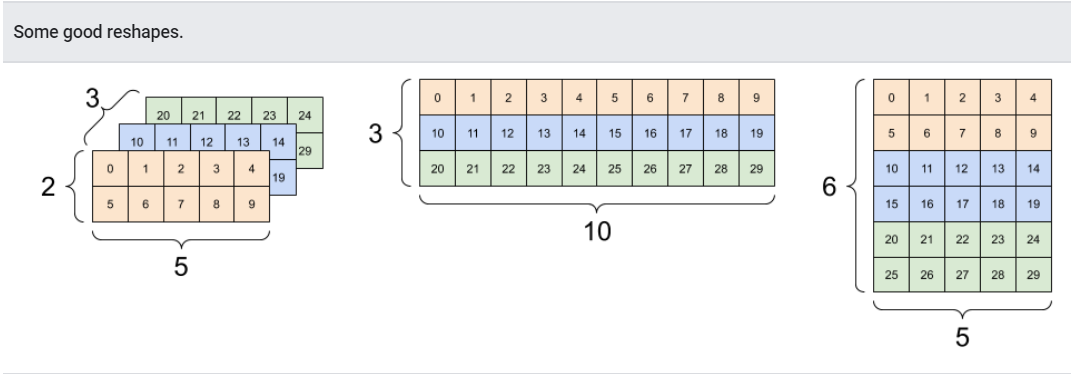
For this 3x2x5 tensor, reshaping to (3x2)x5 or 3x(2x5) are both reasonable things to do, as the slices do not mix:
일반적으로 tf.reshape의 유일한 합리적인 사용은 인접한 축의 결합 or 분리이다.(또는 1의 추가/제거)
3x2x5 텐서를 예로들면, (3x2)x5 또는 3x(2x5)로의 변환은 둘다 슬라이스가 섞이지 않으므로, 합리적이다.
print(tf.reshape(rank_3_tensor, [3*2, 5]), "\n")
print(tf.reshape(rank_3_tensor, [3, -1]))
tf.Tensor(
[[ 0  1  2  3  4]
 [ 5  6  7  8  9]
 [10 11 12 13 14]
 [15 16 17 18 19]
 [20 21 22 23 24]
 [25 26 27 28 29]], shape=(6, 5), dtype=int32)

tf.Tensor(
[[ 0  1  2  3  4  5  6  7  8  9]
 [10 11 12 13 14 15 16 17 18 19]
 [20 21 22 23 24 25 26 27 28 29]], shape=(3, 10), dtype=int32)
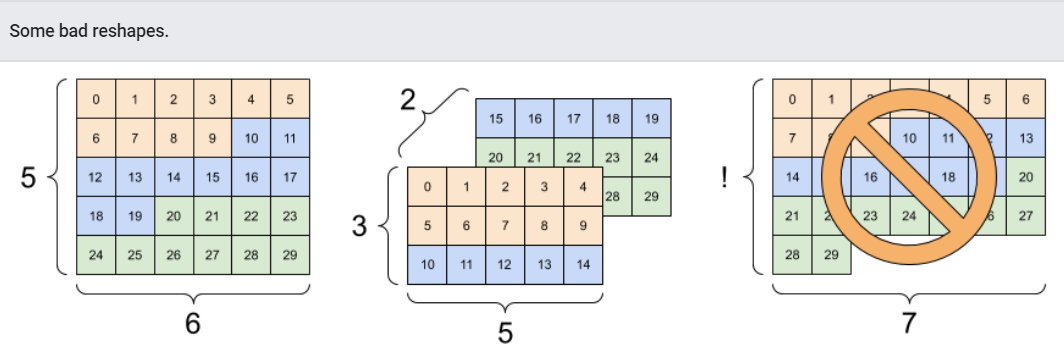
Reshaping will “work” for any new shape with the same total number of elements, but it will not do anything useful if you do not respect the order of the axes.
Swapping axes in tf.reshape does not work; you need tf.transpose for that.
형상변환은 어떠한 새로운 형상에 대해서도 같은 원소갯수를 가지고 작동할 것이다. 그러나 축의 순서를 고려하지 않는다면, 쓸모있지는 않을것이다.
tf.reshape 안에서의 축 교환은 불가능하다. 이 경우엔 tf.transpose가 필요하다.
# Bad examples: don't do this

# You can't reorder axes with reshape.
print(tf.reshape(rank_3_tensor, [2, 3, 5]), "\n")

# This is a mess
print(tf.reshape(rank_3_tensor, [5, 6]), "\n")

# This doesn't work at all
try:
  tf.reshape(rank_3_tensor, [7, -1])
except Exception as e:
  print(f"{type(e).__name__}: {e}")
tf.Tensor(
[[[ 0  1  2  3  4]
  [ 5  6  7  8  9]
  [10 11 12 13 14]]

 [[15 16 17 18 19]
  [20 21 22 23 24]
  [25 26 27 28 29]]], shape=(2, 3, 5), dtype=int32)

tf.Tensor(
[[ 0  1  2  3  4  5]
 [ 6  7  8  9 10 11]
 [12 13 14 15 16 17]
 [18 19 20 21 22 23]
 [24 25 26 27 28 29]], shape=(5, 6), dtype=int32)

InvalidArgumentError: Input to reshape is a tensor with 30 values, but the requested shape requires a multiple of 7 [Op:Reshape]
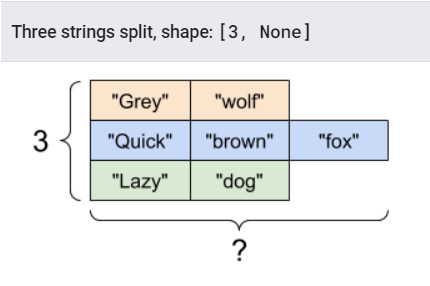
You may run across not-fully-specified shapes. Either the shape contains a None (an axis-length is unknown) or the whole shape is None (the rank of the tensor is unknown).
Except for tf.RaggedTensor, such shapes will only occur in the context of TensorFlow’s symbolic, graph-building APIs:
- tf.function
- The keras functional API.
일부가 특정되지 않은 형상을 실행할때도 있을것이다.형상이 None(축의 길이가 unknwon)을 포함하거나 또는 형상 전체가 None, 즉 텐서의 rank가 unkown인 경우도 있을것이다.
tf.RaggedTensr을 제외하고, 이러한 형상들은 TensorFlow의 상징적인 graph-builiding APIs에서 발생할 수 있다.
- tf.function
- The keras functional API.
More on DTypes
To inspect a tf.Tensor’s data type use the Tensor.dtype property.
When creating a tf.Tensor from a Python object you may optionally specify the datatype.
If you don’t, TensorFlow chooses a datatype that can represent your data. TensorFlow converts Python integers to tf.int32 and Python floating point numbers to tf.float32. Otherwise TensorFlow uses the same rules NumPy uses when converting to arrays.
You can cast from type to type.
tf.Tensor의 데이터 타입을 들여다 보기위해 Tensor.dtype 속성을 사용한다.
파이썬 객체로부터 tf.Tensor을 생성할때, 옵션으로 데이터타입을 지정할수 있다.
만약 그렇지 않는다면, 텐서플로우는 데이터를 표현할수 있는 데이터타입을 선택한다. 텐서플로우는 파이썬 integers를 tf.int32로 바꾸고, 파이썬 실수를 tf.float32으로 바꾼다. 그외에도 텐서플로우는 어레이를 변환할때 Numpy와 같은 규칙을 사용한다.
the_f64_tensor = tf.constant([2.2, 3.3, 4.4], dtype=tf.float64)
the_f16_tensor = tf.cast(the_f64_tensor, dtype=tf.float16)
# Now, cast to an uint8 and lose the decimal precision
the_u8_tensor = tf.cast(the_f16_tensor, dtype=tf.uint8)
print(the_u8_tensor)
tf.Tensor([2 3 4], shape=(3,), dtype=uint8)
Broadcasting
Broadcasting is a concept borrowed from the equivalent feature in NumPy. In short, under certain conditions, smaller tensors are “stretched” automatically to fit larger tensors when running combined operations on them.
The simplest and most common case is when you attempt to multiply or add a tensor to a scalar. In that case, the scalar is broadcast to be the same shape as the other argument.
“브로드캐스팅”은 넘파이의 특성으로 부터 가져온 개념이다. 특정한 상태에서, 결합 연산을 수행할때, 작은 텐서는 더 큰 텐서에 맞춰 자동적으로 “확장”된다.
이 브로드 캐스팅의 가장 간단하고 일반적인 경우는 텐서를 스칼라에 곱이나 덧셈연산을 할때이다. 이러한 경우 스칼라는 다른 argument와 같은 형상이 되도록 브로드캐스드 된다.
x = tf.constant([1, 2, 3])

y = tf.constant(2)
z = tf.constant([2, 2, 2])
#모두 같은 연산이다.
print(tf.multiply(x, 2))
print(x * y)
print(x * z)
tf.Tensor([2 4 6], shape=(3,), dtype=int32)
tf.Tensor([2 4 6], shape=(3,), dtype=int32)
tf.Tensor([2 4 6], shape=(3,), dtype=int32)
Likewise, axes with length 1 can be stretched out to match the other arguments. Both arguments can be stretched in the same computation.
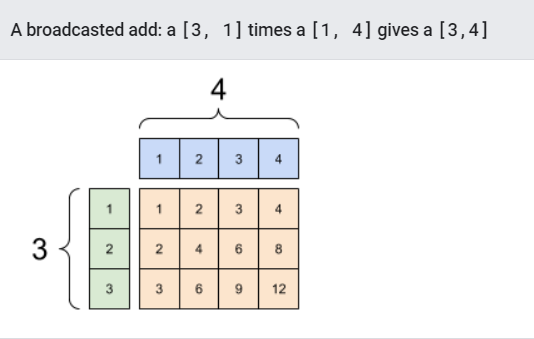
In this case a 3x1 matrix is element-wise multiplied by a 1x4 matrix to produce a 3x4 matrix. Note how the leading 1 is optional: The shape of y is [4].
이와 같이, 길이가 1인 축은 다른 argument와 매치될수 있도록 확장된다. 양쪽의 arguments는 같은 계산으로 확장될수 있다.
3x1 행렬의 경우, 1x4 행렬의 element-wise곱연산은 3x4행렬을 만들어낸다. 앞의 “1”이 옵션인것에 주목하자. y의 형상은 [4]이다.
#모두 같은연산이다
x = tf.reshape(x,[3,1])
y = tf.range(1, 5)
print(x, "\n")
print(y, "\n")
print(tf.multiply(x, y))
tf.Tensor(
[[1]
 [2]
 [3]], shape=(3, 1), dtype=int32)

tf.Tensor([1 2 3 4], shape=(4,), dtype=int32)

tf.Tensor(
[[ 1  2  3  4]
 [ 2  4  6  8]
 [ 3  6  9 12]], shape=(3, 4), dtype=int32)
브로드캐스트를 사용하지 않고도 위와 같은 연산을 할수 있다.
x_stretch = tf.constant([[1, 1, 1, 1],
                         [2, 2, 2, 2],
                         [3, 3, 3, 3]])

y_stretch = tf.constant([[1, 2, 3, 4],
                         [1, 2, 3, 4],
                         [1, 2, 3, 4]])

print(x_stretch * y_stretch)  # Again, operator overloading
tf.Tensor(
[[ 1  2  3  4]
 [ 2  4  6  8]
 [ 3  6  9 12]], shape=(3, 4), dtype=int32)
Most of the time, broadcasting is both time and space efficient, as the broadcast operation never materializes the expanded tensors in memory.
You see what broadcasting looks like using tf.broadcast_to.
대부분의 경우, 브로드캐스팅은 시간과 공간이 효율적인데 이는 브로드캐스트 연산이 메모리에서 확장된 텐서를 실체화 하지 않기 때문이다.
print(tf.broadcast_to(tf.constant([1, 2, 3]), [3, 3]))
tf.Tensor(
[[1 2 3]
 [1 2 3]
 [1 2 3]], shape=(3, 3), dtype=int32)
Unlike a mathematical op, for example, broadcast_to does nothing special to save memory. Here, you are materializing the tensor.
It can get even more complicated. This section of Jake VanderPlas’s book Python Data Science Handbook shows more broadcasting tricks (again in NumPy).
예를들면 수학적인 연산과는 다르게, 브로드캐스트는 메모리를 절약하기위한 어떠한 특별한것도 하지 않는다. 여기에 텐서를 실체화한다.
거기에 더 복잡해질수 있다.
tf.convert_to_tensor
Most ops, like tf.matmul and tf.reshape take arguments of class tf.Tensor. However, you’ll notice in the above case, Python objects shaped like tensors are accepted.
Most, but not all, ops call convert_to_tensor on non-tensor arguments. There is a registry of conversions, and most object classes like NumPy’s ndarray, TensorShape, Python lists, and tf.Variable will all convert automatically.
See tf.register_tensor_conversion_function for more details, and if you have your own type you’d like to automatically convert to a tensor.
tf.matmul과 tf.reshape와 같은 대부분의 연산은 tf.Tensor 클래스의 인수들을 취급하지만, 위의 경우를 생각해보면, 텐서와 같이 형상 파이썬 객체는 넘기는경우가 있다.
전부는 아니지만, 대부분 연산은 비텐서 인수에 대해서 convert_to_tensor 혹은 non_tesnsor arguments를 호출한다. 변환의 레지스트리가 있고, NumPy의 ndarray, TensorShape, Python lists, 그리고 tf.Variable과 같은 많은 객체 클래스들은 자동적으로 변환될 것이다.
Ragged Tensors
A tensor with variable numbers of elements along some axis is called “ragged”. Use tf.ragged.RaggedTensor for ragged data.
For example, This cannot be represented as a regular tensor:
축에 맞춰 요소의 수가 변하는 텐서를 “비정형”이라 부른다. 비정형 데이터에 tf.ragged.RaggedTensor를 써보자.
예를들어 다음의 경우는 정규 텐서로 대표될수 없다.
ragged_list = [
    [0, 1, 2, 3],
    [4, 5],
    [6, 7, 8],
    [9]]

try:
  tensor = tf.constant(ragged_list)
except Exception as e:
  print(f"{type(e).__name__}: {e}")
ValueError: Can't convert non-rectangular Python sequence to Tensor.
Instead create a tf.RaggedTensor using tf.ragged.constant:
대신, tf.ragged.constant를 사용해 tf.RaggedTensor를 생성해보자.
ragged_tensor = tf.ragged.constant(ragged_list)
print(ragged_tensor)
<tf.RaggedTensor [[0, 1, 2, 3], [4, 5], [6, 7, 8], [9]]>
The shape of a tf.RaggedTensor will contain some axes with unknown lengths:
tf.RaggedTensor의 형상은 길이가 불명확한 축을 포함할것이다.
print(ragged_tensor.shape)
(4, None)
String tensors
tf.string is a dtype, which is to say you can represent data as strings (variable-length byte arrays) in tensors.
The strings are atomic and cannot be indexed the way Python strings are. The length of the string is not one of the axes of the tensor. See tf.strings for functions to manipulate them.
Here is a scalar string tensor:
tf.string은 텐서에서 데이터를 문자열(길이-가변 바이트 배열)로 표현할수 있는 dtype이다.
문자열은 atomic하고 파이썬 문자열과 같은 방식으로 인덱싱 될수 없다. 문자의 길이는 텐서의 하나의 축이 아니다.
다음은 스칼라 문자열 텐서이다.
# Tensors can be strings, too here is a scalar string.
scalar_string_tensor = tf.constant("Gray wolf")
print(scalar_string_tensor)
tf.Tensor(b'Gray wolf', shape=(), dtype=string)
스트링의 벡터는

# 길이가 다른 3개의 문자열 텐서는 괜찮다.
tensor_of_strings = tf.constant(["Gray wolf",
                                 "Quick brown fox",
                                 "Lazy dog"])
# 형상이(3,)인것에 주목하자. 문자열길이는 포함되지 않았다.
print(tensor_of_strings)
tf.Tensor([b'Gray wolf' b'Quick brown fox' b'Lazy dog'], shape=(3,), dtype=string)
In the above printout the b prefix indicates that tf.string dtype is not a unicode string, but a byte-string. See the Unicode Tutorial for more about working with unicode text in TensorFlow.
If you pass unicode characters they are utf-8 encoded.
위의 출력에서, 접두사 b는 tf.strying dtype이 유니코드 문자열이 아니라, 바이트 문자열을 말한다.
만약 유니코드 문자를 전달해줄경우, utf-8로 인코드된다.
tf.constant("🥳👍")
<tf.Tensor: shape=(), dtype=string, numpy=b'\xf0\x9f\xa5\xb3\xf0\x9f\x91\x8d'>
Some basic functions with strings can be found in tf.strings, including tf.strings.split.
tf.srings와 tf.srings.split에는 문자열에 관한 기본적인 함수가 담겨져있다.
# 문자열을 텐서의 집합으로 분할하고 싶은경우 split을 사용할수 있다.
print(tf.strings.split(scalar_string_tensor, sep=" "))
tf.Tensor([b'Gray' b'wolf'], shape=(2,), dtype=string)
#그러나 문자열텐서를 분할할경우, "비정형 텐서"가 되는데
# 각 문자열은 다른 영역으로 분할될 것이다.
print(tf.strings.split(tensor_of_strings))
<tf.RaggedTensor [[b'Gray', b'wolf'], [b'Quick', b'brown', b'fox'], [b'Lazy', b'dog']]>
And tf.string.to_number:
text = tf.constant("1 10 100")
print(tf.strings.to_number(tf.strings.split(text, " ")))
tf.Tensor([ 1. 10. 100.], shape=(3,), dtype=float32)
Although you can’t use tf.cast to turn a string tensor into numbers, you can convert it into bytes, and then into numbers.
tf.cast를 사용해 문자열텐서를 숫자로 바꿀순 없지만, 이를 바이트로 바꾼뒤, 다시 숫자로 바꿀순 있다.
byte_strings = tf.strings.bytes_split(tf.constant("Duck"))
byte_ints = tf.io.decode_raw(tf.constant("Duck"), tf.uint8)
print("Byte strings:", byte_strings)
print("Bytes:", byte_ints)
Byte strings: tf.Tensor([b'D' b'u' b'c' b'k'], shape=(4,), dtype=string)
Bytes: tf.Tensor([ 68 117  99 107], shape=(4,), dtype=uint8)
# Or split it up as unicode and then decode it
unicode_bytes = tf.constant("アヒル 🦆")
unicode_char_bytes = tf.strings.unicode_split(unicode_bytes, "UTF-8")
unicode_values = tf.strings.unicode_decode(unicode_bytes, "UTF-8")

print("\nUnicode bytes:", unicode_bytes)
print("\nUnicode chars:", unicode_char_bytes)
print("\nUnicode values:", unicode_values)
Unicode bytes: tf.Tensor(b'\xe3\x82\xa2\xe3\x83\x92\xe3\x83\xab \xf0\x9f\xa6\x86', shape=(), dtype=string)

Unicode chars: tf.Tensor([b'\xe3\x82\xa2' b'\xe3\x83\x92' b'\xe3\x83\xab' b' ' b'\xf0\x9f\xa6\x86'], shape=(5,), dtype=string)

Unicode values: tf.Tensor([ 12450  12498  12523     32 129414], shape=(5,), dtype=int32)
The tf.string dtype is used for all raw bytes data in TensorFlow. The tf.io module contains functions for converting data to and from bytes, including decoding images and parsing csv.
tf.string dtype는 텐서플로우 안의 모든 raw bytes date에 사용된다.
tf.io 모듈은 이미지의 해독과 csv 분석 등 데이터와 바이트 변환하는 함수를 포함한다.
Sparse tensors
Sometimes, your data is sparse, like a very wide embedding space. TensorFlow supports tf.sparse.SparseTensor and related operations to store sparse data efficiently.
가끔, 공간이 매우 커서 데이터가 결측값이 많을때도 있다. 텐서플로우는 빈공간을 효율적으로 저장하기 위해, tf.sparse.SparseTensor와 관련된 기능들을 제공한다.
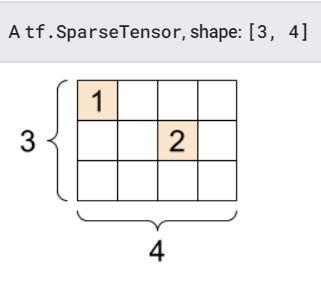
# 희소 텐서는 인덱스의 값들을 메모리에 효율적인 방식으로 저장한다.
sparse_tensor = tf.sparse.SparseTensor(indices=[[0, 0], [1, 2]],
                                       values=[1, 2],
                                       dense_shape=[3, 4])
print(sparse_tensor, "\n")

# You can convert sparse tensors to dense
print(tf.sparse.to_dense(sparse_tensor))
SparseTensor(indices=tf.Tensor(
[[0 0]
 [1 2]], shape=(2, 2), dtype=int64), values=tf.Tensor([1 2], shape=(2,), dtype=int32), dense_shape=tf.Tensor([3 4], shape=(2,), dtype=int64))

tf.Tensor(
[[1 0 0 0]
 [0 0 2 0]
 [0 0 0 0]], shape=(3, 4), dtype=int32)
Leave a comment